> ## Documentation Index
> Fetch the complete documentation index at: https://docs.litefold.ai/llms.txt
> Use this file to discover all available pages before exploring further.
# De Novo Drug Design
> Generate novel molecules optimized for your target using generative AI
## Overview
De Novo Drug Design in LiteFold enables users to generate novel small molecules or peptides for a selected protein target. The workflow follows a project-based approach where users select a project, load a protein structure, define a binding pocket, and launch molecule generation from the chosen site.
This module is designed for early-stage drug discovery, lead generation, and structure-guided molecular design. By combining target selection, pocket configuration, and AI-powered generation into a single workspace, LiteFold simplifies the transition from protein structure analysis to candidate molecule creation.
## Getting Started
### Step 1: Open De Novo
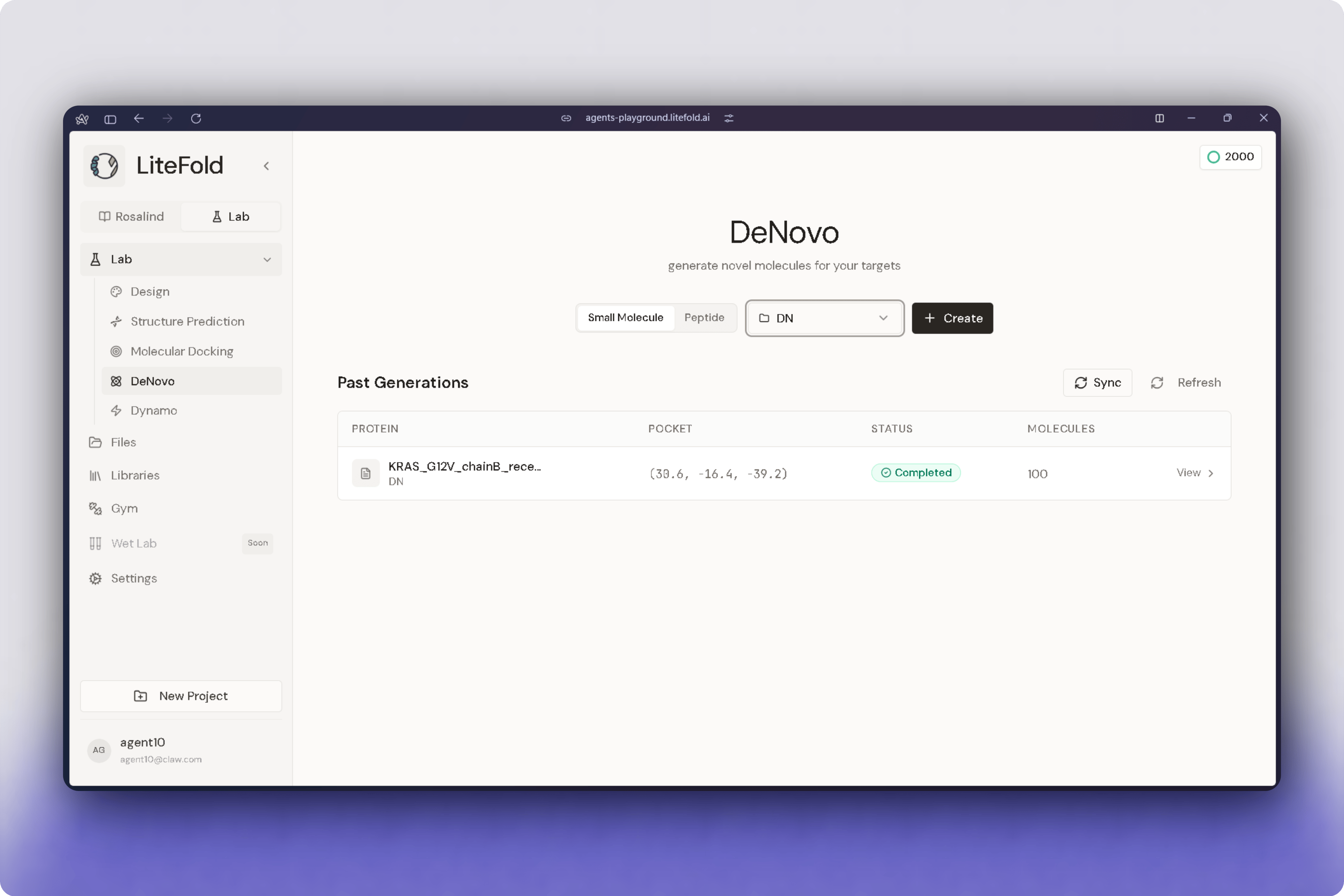
Navigate to **Lab → DeNovo**.
The DeNovo home page displays previous generations and provides access to two generation modes:
* Small Molecule
* Peptide
### Step 2: Choose a Design Mode
Select the generation mode appropriate for your project.
**Small Molecule** mode generates drug-like compounds designed to fit a selected binding pocket.
**Peptide** mode generates peptide-based candidates for targets where peptide binding may be preferred.
### Step 3: Select a Project
Choose the project containing the protein target you want to design against.
Projects serve as centralized workspaces for storing protein structures, generated molecules, and generation history.
### Step 4: Load the Protein Structure
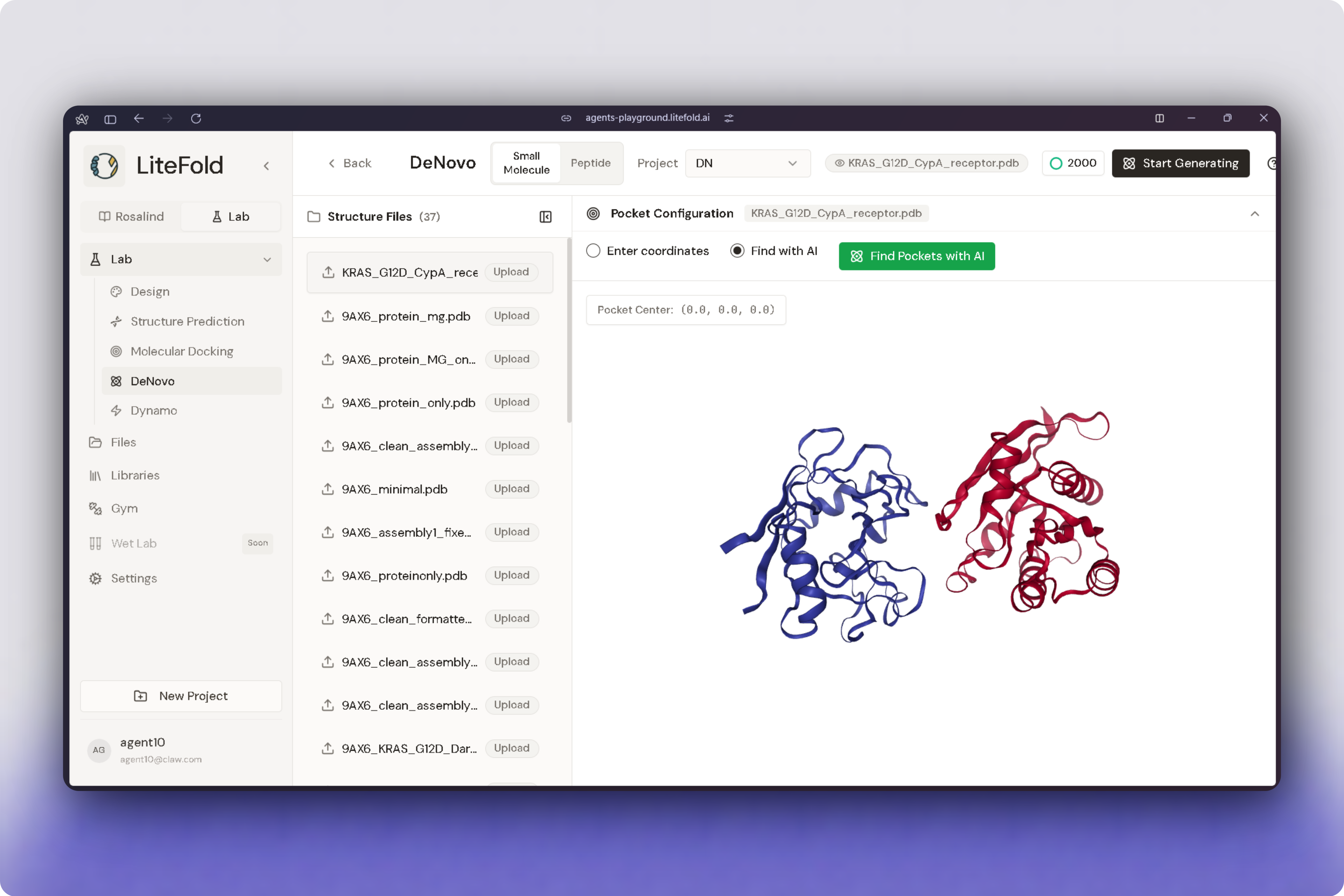
Open the selected project and choose a protein structure file from the available structure list.
The selected protein is displayed in the 3D viewer, allowing you to inspect the target before starting the generation process.
### Step 5: Configure the Binding Pocket
LiteFold supports two methods for defining the target binding site.
You may manually enter pocket coordinates if the binding site is already known, or use AI-assisted pocket detection to identify likely binding regions automatically.
The detected or selected pocket becomes the target region for molecule generation.
### Step 6: Start Generating
After the protein structure and binding pocket have been configured, click **Start Generating**.
LiteFold submits the generation job and begins creating candidate molecules optimized for the selected target site.
## Generation Workspace
The generation workspace combines protein visualization, pocket configuration, and generation controls within a single interface.
This allows users to inspect the protein structure, verify the selected pocket location, adjust coordinates when necessary, and launch generation jobs without leaving the workspace.
Because generated molecules are designed specifically around the selected pocket, reviewing the pocket location before submission is strongly recommended.
## Reviewing Past Generations
The DeNovo dashboard includes a **Past Generations** section that provides access to previously completed generation jobs.
This allows users to revisit earlier runs, compare outputs, track project progress, and continue work on promising targets without repeating setup steps.
Past generations can be used to:
* Compare multiple design strategies
* Review generated compounds
* Track project progress
* Reuse promising candidates
## How LiteFold Uses the Binding Pocket
The selected pocket defines the region used for molecular design.
LiteFold analyzes the geometry and characteristics of the chosen site and generates molecules intended to complement that region of the protein.
Pocket selection plays a major role in generation quality. Incorrect pocket placement may result in compounds that do not fit the desired binding site effectively. For this reason, users should verify pocket location before launching a generation run.
## After Generation
Once generation is complete, LiteFold produces a collection of candidate molecules associated with the selected target.
These generated compounds can be reviewed and used in downstream workflows, including molecular docking, lead optimization, and additional design iterations.
Common applications include:
* Lead generation
* Scaffold exploration
* Pocket-focused molecule design
* Follow-up docking studies
* Structure-based optimization campaigns
## Reviewing Generated Molecules
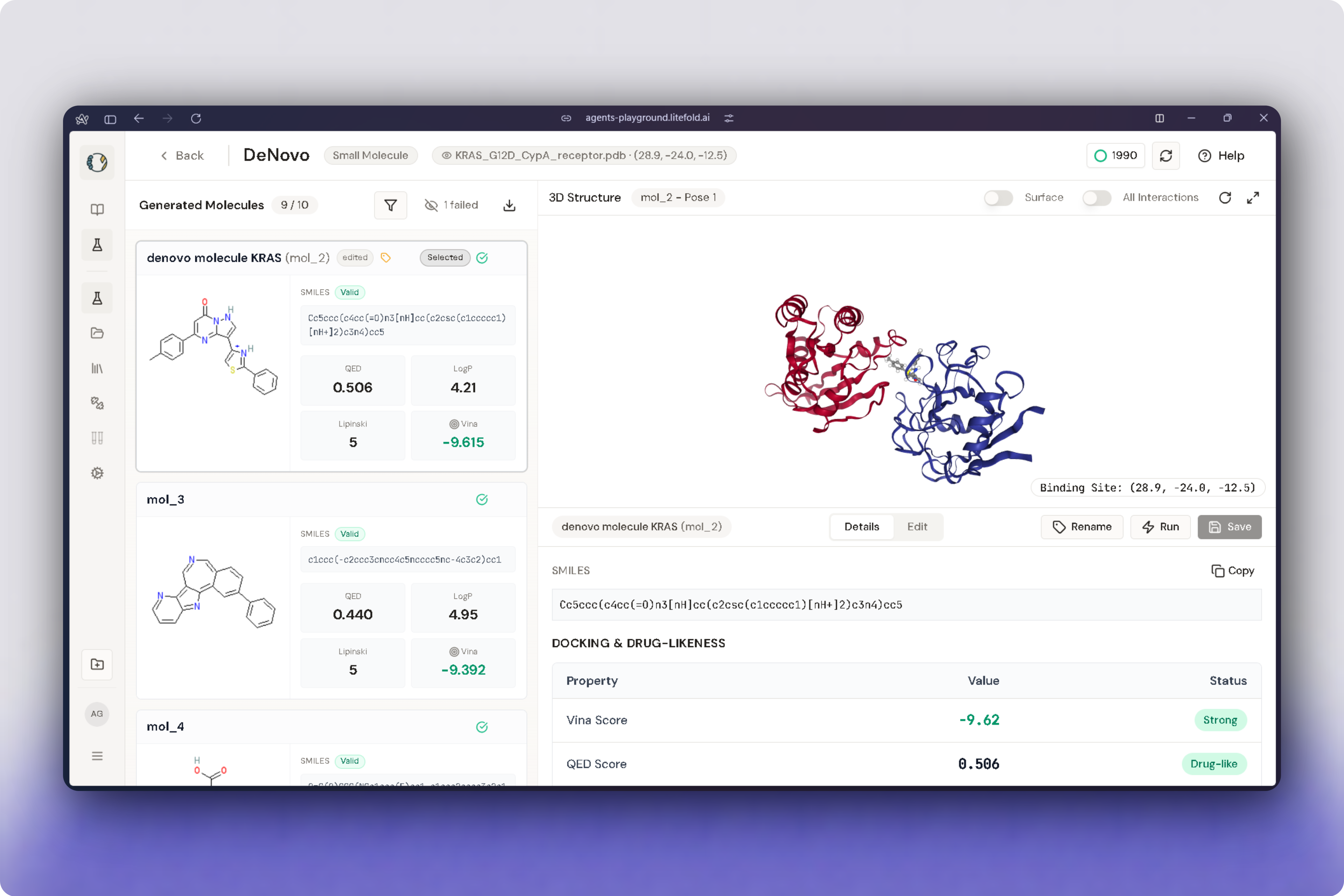
Once generation is complete, LiteFold displays all successfully generated candidates in the **Generated Molecules** panel.
Each molecule includes a structural preview along with key molecular properties used for candidate assessment.
Typical information displayed includes:
| Property | Description |
| -------------- | -------------------------------------------------- |
| SMILES | Molecular representation of the generated compound |
| QED Score | Quantitative estimate of drug-likeness |
| LogP | Predicted lipophilicity |
| Lipinski Score | Compliance with Lipinski's Rule of Five |
| Vina Score | Predicted binding affinity |
These metrics help users quickly compare generated compounds and prioritize candidates for further study.
## Molecule Editing
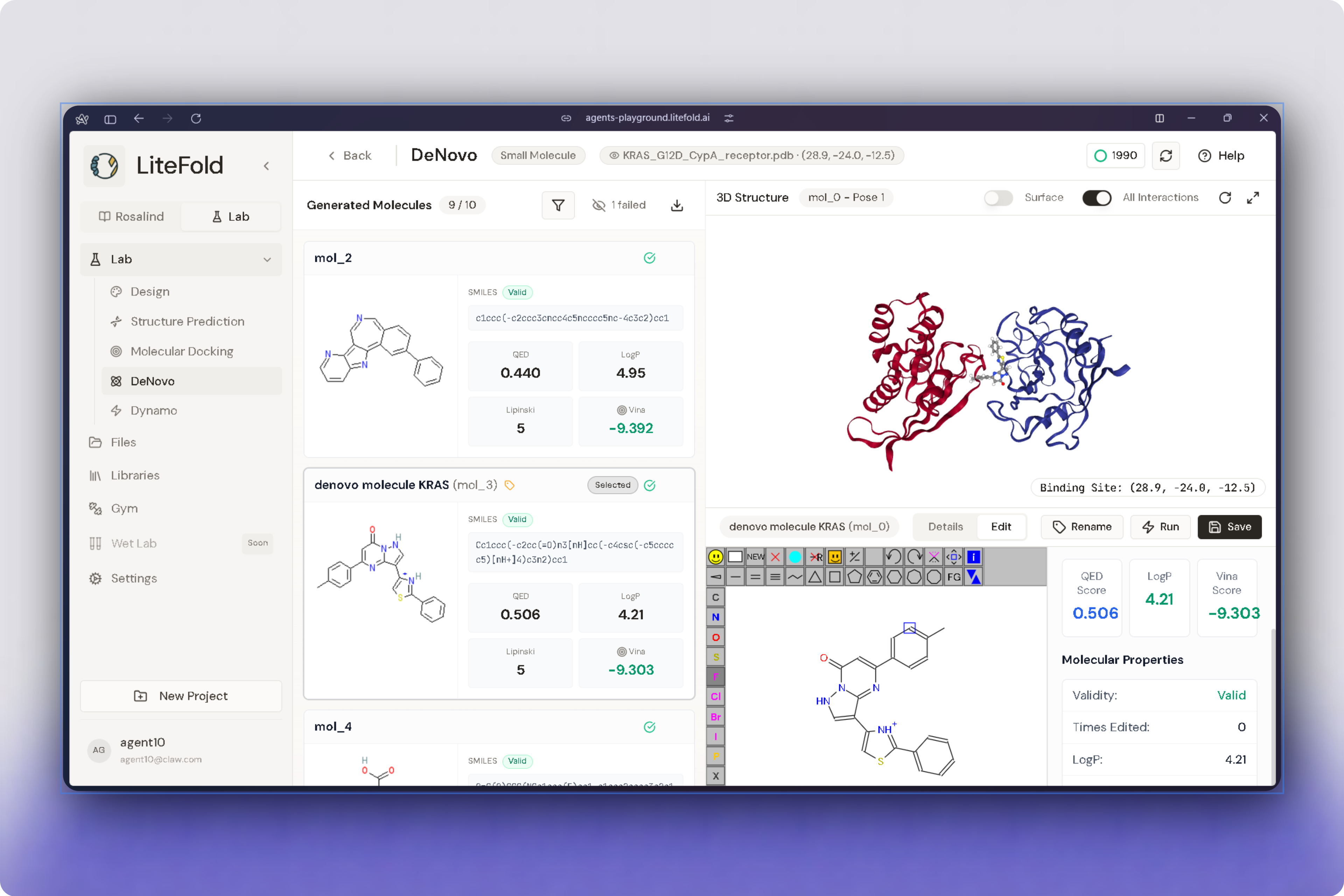
Generated molecules can be modified directly within LiteFold using the built-in molecular editor.
The editor supports common medicinal chemistry operations including atom manipulation, bond editing, functional group modification, and scaffold refinement.
This allows users to optimize generated compounds without exporting them to external software.
Available actions include:
* Edit molecular structures
* Refine functional groups
* Modify ring systems
* Create new bonds
* Save updated molecules
* Launch additional analyses
## Property Prediction and Evaluation
For every generated molecule, LiteFold automatically predicts a collection of molecular and docking-related properties.
The **Docking & Drug-Likeness** panel provides a summarized assessment of candidate quality.
Typical outputs include:
| Metric | Description |
| -------------- | -------------------------- |
| Vina Score | Predicted docking affinity |
| QED Score | Drug-likeness evaluation |
| LogP | Lipophilicity estimate |
| Lipinski Rules | Drug-likeness compliance |
Based on these values, LiteFold assigns qualitative labels such as:
* Strong
* Drug-like
* Optimal
* Pass
These indicators help prioritize compounds for downstream validation.
## Best Practices
Use a high-quality protein structure whenever possible. Carefully verify the selected binding pocket, particularly when using AI-assisted detection.
For known targets, manually defining coordinates can provide greater control over the design region. For exploratory projects, AI pocket detection offers a fast and effective way to identify potential binding sites.
Generated molecules should always be reviewed after generation. Strong candidates typically exhibit good pocket compatibility, reasonable chemical structures, and clear potential for further docking or optimization studies.
## Next Steps
After generation, candidate molecules can be advanced into other LiteFold workflows, including:
* Molecular Docking
* Structure Prediction
* Additional DeNovo design rounds
* Project-level comparison and review
 ### Step 2: Choose a Design Mode
Select the generation mode appropriate for your project.
**Small Molecule** mode generates drug-like compounds designed to fit a selected binding pocket.
**Peptide** mode generates peptide-based candidates for targets where peptide binding may be preferred.
### Step 3: Select a Project
Choose the project containing the protein target you want to design against.
Projects serve as centralized workspaces for storing protein structures, generated molecules, and generation history.
### Step 4: Load the Protein Structure
Open the selected project and choose a protein structure file from the available structure list.
The selected protein is displayed in the 3D viewer, allowing you to inspect the target before starting the generation process.
### Step 2: Choose a Design Mode
Select the generation mode appropriate for your project.
**Small Molecule** mode generates drug-like compounds designed to fit a selected binding pocket.
**Peptide** mode generates peptide-based candidates for targets where peptide binding may be preferred.
### Step 3: Select a Project
Choose the project containing the protein target you want to design against.
Projects serve as centralized workspaces for storing protein structures, generated molecules, and generation history.
### Step 4: Load the Protein Structure
Open the selected project and choose a protein structure file from the available structure list.
The selected protein is displayed in the 3D viewer, allowing you to inspect the target before starting the generation process.
 ### Step 5: Configure the Binding Pocket
LiteFold supports two methods for defining the target binding site.
You may manually enter pocket coordinates if the binding site is already known, or use AI-assisted pocket detection to identify likely binding regions automatically.
The detected or selected pocket becomes the target region for molecule generation.
### Step 6: Start Generating
After the protein structure and binding pocket have been configured, click **Start Generating**.
LiteFold submits the generation job and begins creating candidate molecules optimized for the selected target site.
## Generation Workspace
The generation workspace combines protein visualization, pocket configuration, and generation controls within a single interface.
This allows users to inspect the protein structure, verify the selected pocket location, adjust coordinates when necessary, and launch generation jobs without leaving the workspace.
Because generated molecules are designed specifically around the selected pocket, reviewing the pocket location before submission is strongly recommended.
## Reviewing Past Generations
The DeNovo dashboard includes a **Past Generations** section that provides access to previously completed generation jobs.
This allows users to revisit earlier runs, compare outputs, track project progress, and continue work on promising targets without repeating setup steps.
Past generations can be used to:
* Compare multiple design strategies
* Review generated compounds
* Track project progress
* Reuse promising candidates
### Step 5: Configure the Binding Pocket
LiteFold supports two methods for defining the target binding site.
You may manually enter pocket coordinates if the binding site is already known, or use AI-assisted pocket detection to identify likely binding regions automatically.
The detected or selected pocket becomes the target region for molecule generation.
### Step 6: Start Generating
After the protein structure and binding pocket have been configured, click **Start Generating**.
LiteFold submits the generation job and begins creating candidate molecules optimized for the selected target site.
## Generation Workspace
The generation workspace combines protein visualization, pocket configuration, and generation controls within a single interface.
This allows users to inspect the protein structure, verify the selected pocket location, adjust coordinates when necessary, and launch generation jobs without leaving the workspace.
Because generated molecules are designed specifically around the selected pocket, reviewing the pocket location before submission is strongly recommended.
## Reviewing Past Generations
The DeNovo dashboard includes a **Past Generations** section that provides access to previously completed generation jobs.
This allows users to revisit earlier runs, compare outputs, track project progress, and continue work on promising targets without repeating setup steps.
Past generations can be used to:
* Compare multiple design strategies
* Review generated compounds
* Track project progress
* Reuse promising candidates
 ## How LiteFold Uses the Binding Pocket
The selected pocket defines the region used for molecular design.
LiteFold analyzes the geometry and characteristics of the chosen site and generates molecules intended to complement that region of the protein.
Pocket selection plays a major role in generation quality. Incorrect pocket placement may result in compounds that do not fit the desired binding site effectively. For this reason, users should verify pocket location before launching a generation run.
## After Generation
Once generation is complete, LiteFold produces a collection of candidate molecules associated with the selected target.
These generated compounds can be reviewed and used in downstream workflows, including molecular docking, lead optimization, and additional design iterations.
Common applications include:
* Lead generation
* Scaffold exploration
* Pocket-focused molecule design
* Follow-up docking studies
* Structure-based optimization campaigns
## Reviewing Generated Molecules
Once generation is complete, LiteFold displays all successfully generated candidates in the **Generated Molecules** panel.
Each molecule includes a structural preview along with key molecular properties used for candidate assessment.
Typical information displayed includes:
| Property | Description |
| -------------- | -------------------------------------------------- |
| SMILES | Molecular representation of the generated compound |
| QED Score | Quantitative estimate of drug-likeness |
| LogP | Predicted lipophilicity |
| Lipinski Score | Compliance with Lipinski's Rule of Five |
| Vina Score | Predicted binding affinity |
These metrics help users quickly compare generated compounds and prioritize candidates for further study.
## How LiteFold Uses the Binding Pocket
The selected pocket defines the region used for molecular design.
LiteFold analyzes the geometry and characteristics of the chosen site and generates molecules intended to complement that region of the protein.
Pocket selection plays a major role in generation quality. Incorrect pocket placement may result in compounds that do not fit the desired binding site effectively. For this reason, users should verify pocket location before launching a generation run.
## After Generation
Once generation is complete, LiteFold produces a collection of candidate molecules associated with the selected target.
These generated compounds can be reviewed and used in downstream workflows, including molecular docking, lead optimization, and additional design iterations.
Common applications include:
* Lead generation
* Scaffold exploration
* Pocket-focused molecule design
* Follow-up docking studies
* Structure-based optimization campaigns
## Reviewing Generated Molecules
Once generation is complete, LiteFold displays all successfully generated candidates in the **Generated Molecules** panel.
Each molecule includes a structural preview along with key molecular properties used for candidate assessment.
Typical information displayed includes:
| Property | Description |
| -------------- | -------------------------------------------------- |
| SMILES | Molecular representation of the generated compound |
| QED Score | Quantitative estimate of drug-likeness |
| LogP | Predicted lipophilicity |
| Lipinski Score | Compliance with Lipinski's Rule of Five |
| Vina Score | Predicted binding affinity |
These metrics help users quickly compare generated compounds and prioritize candidates for further study.
 ## Molecule Editing
Generated molecules can be modified directly within LiteFold using the built-in molecular editor.
The editor supports common medicinal chemistry operations including atom manipulation, bond editing, functional group modification, and scaffold refinement.
This allows users to optimize generated compounds without exporting them to external software.
Available actions include:
* Edit molecular structures
* Refine functional groups
* Modify ring systems
* Create new bonds
* Save updated molecules
* Launch additional analyses
## Property Prediction and Evaluation
For every generated molecule, LiteFold automatically predicts a collection of molecular and docking-related properties.
The **Docking & Drug-Likeness** panel provides a summarized assessment of candidate quality.
Typical outputs include:
| Metric | Description |
| -------------- | -------------------------- |
| Vina Score | Predicted docking affinity |
| QED Score | Drug-likeness evaluation |
| LogP | Lipophilicity estimate |
| Lipinski Rules | Drug-likeness compliance |
Based on these values, LiteFold assigns qualitative labels such as:
* Strong
* Drug-like
* Optimal
* Pass
These indicators help prioritize compounds for downstream validation.
## Best Practices
Use a high-quality protein structure whenever possible. Carefully verify the selected binding pocket, particularly when using AI-assisted detection.
For known targets, manually defining coordinates can provide greater control over the design region. For exploratory projects, AI pocket detection offers a fast and effective way to identify potential binding sites.
Generated molecules should always be reviewed after generation. Strong candidates typically exhibit good pocket compatibility, reasonable chemical structures, and clear potential for further docking or optimization studies.
## Next Steps
After generation, candidate molecules can be advanced into other LiteFold workflows, including:
* Molecular Docking
* Structure Prediction
* Additional DeNovo design rounds
* Project-level comparison and review
## Molecule Editing
Generated molecules can be modified directly within LiteFold using the built-in molecular editor.
The editor supports common medicinal chemistry operations including atom manipulation, bond editing, functional group modification, and scaffold refinement.
This allows users to optimize generated compounds without exporting them to external software.
Available actions include:
* Edit molecular structures
* Refine functional groups
* Modify ring systems
* Create new bonds
* Save updated molecules
* Launch additional analyses
## Property Prediction and Evaluation
For every generated molecule, LiteFold automatically predicts a collection of molecular and docking-related properties.
The **Docking & Drug-Likeness** panel provides a summarized assessment of candidate quality.
Typical outputs include:
| Metric | Description |
| -------------- | -------------------------- |
| Vina Score | Predicted docking affinity |
| QED Score | Drug-likeness evaluation |
| LogP | Lipophilicity estimate |
| Lipinski Rules | Drug-likeness compliance |
Based on these values, LiteFold assigns qualitative labels such as:
* Strong
* Drug-like
* Optimal
* Pass
These indicators help prioritize compounds for downstream validation.
## Best Practices
Use a high-quality protein structure whenever possible. Carefully verify the selected binding pocket, particularly when using AI-assisted detection.
For known targets, manually defining coordinates can provide greater control over the design region. For exploratory projects, AI pocket detection offers a fast and effective way to identify potential binding sites.
Generated molecules should always be reviewed after generation. Strong candidates typically exhibit good pocket compatibility, reasonable chemical structures, and clear potential for further docking or optimization studies.
## Next Steps
After generation, candidate molecules can be advanced into other LiteFold workflows, including:
* Molecular Docking
* Structure Prediction
* Additional DeNovo design rounds
* Project-level comparison and review